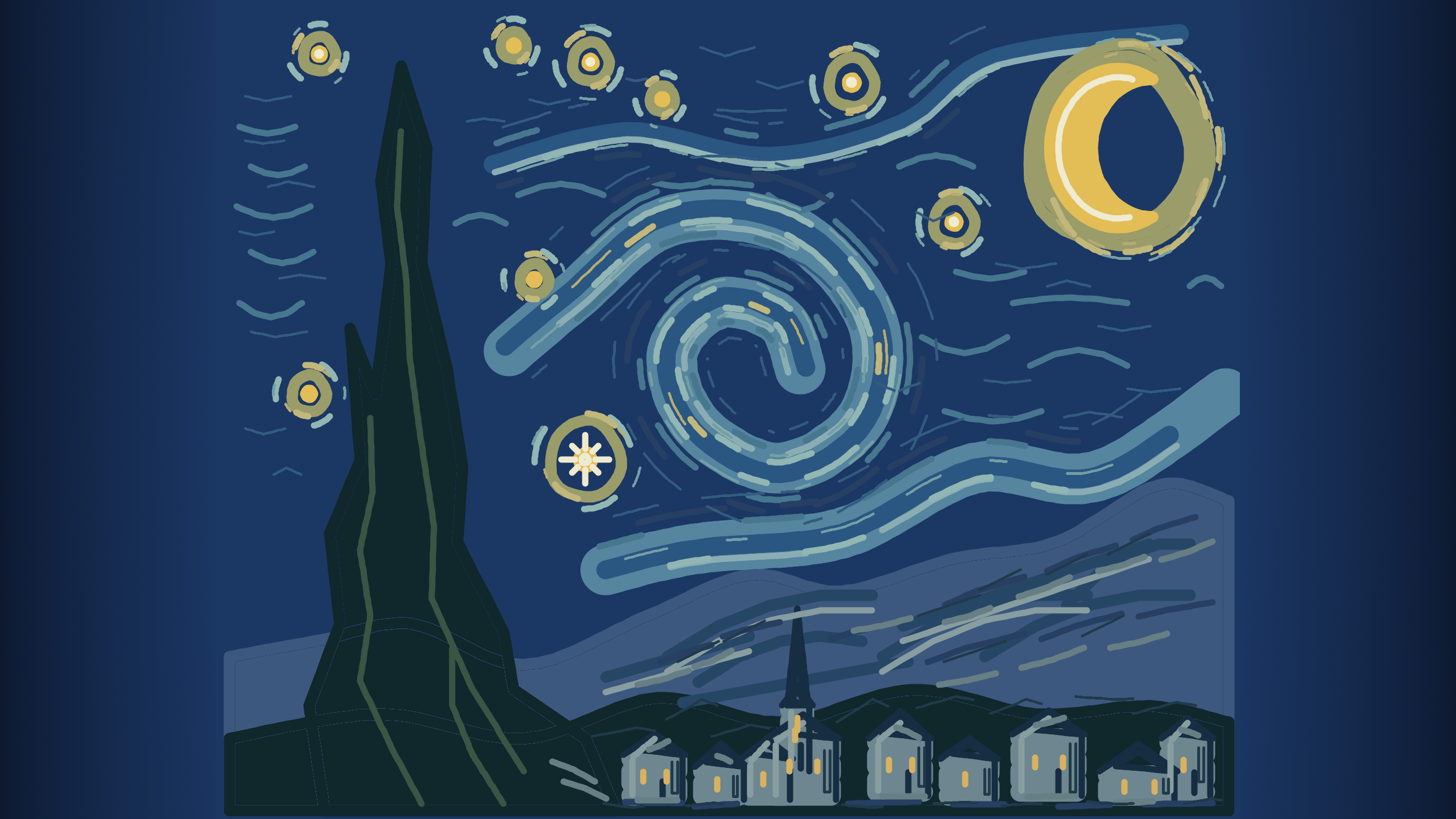
Image created with Dots Body harness through Codex in MS Paint (Terra 6.1 - medium effort)
Recursive Workflow Improvement
Digital Apprenticeship for Desktop Agents
By Flux (Cameron Tavassoli)
With contributions from Codex and Dotty
Github Repo: BeyondRandom/dots-body
Abstract
I started this project because I wanted my agent to take a picture of my desktop and send it back to me. That request led to Dots Body, a Windows automation harness that lets agents observe software, execute sequences of mouse and keyboard actions, and save useful procedures as reusable recipes. Once I could watch an agent work, I wanted to know whether I could teach it a better technique and have that lesson survive the conversation.
I call this process Recursive Workflow Improvement, or RWI. A person or agent identifies a useful operation. A worker turns it into a callable recipe and tests its effect in the application. A later worker can find, reuse, revise, or combine that recipe with others. This gives us a form of digital apprenticeship in which people can pass on how they work while the model weights stay fixed during the learning loop.
We explored RWI through desktop painting, browser tasks, and legacy CAD. Across five Paint badge iterations, recorded tool dispatches fell from 397 to 264, and the comparable control-to-capture interval fell from 17 minutes and 42 seconds to 10 minutes and 10 seconds. In two five-hour Vermeer studies, the guided worker used 39 percent fewer recorded dispatches and produced a composition we judged closer to the reference. Coaching, recipe use, and save cadence changed together. In the final one-hour Terra study, a human instruction became a tagged brush-fill recipe 85 seconds after it reached the worker. Three invocations exposed problems with edge clearance and coverage. Together, these studies show how a technique can be taught during live work, what can be retained for the next worker, and why successful reuse needs evidence of its own.
I. Introduction
A. The desktop I could reach but could not see
Well, GTA VI is finally out, but instead of spending my time playing (which I really did want to do), I’ve been compelled by my desire to make the world autonomous to spend my evenings teaching an AI how to use my computer. I figured I’d start with something easy. I pulled out my phone and asked Dotty, the name I gave my Dot agent, “Can you take a picture of my desktop and send it to me?”
My Windows PC connected. Dotty could tell it was there. The chat still couldn’t capture the desktop. So I tried asking for less. Could it open Notepad, type a line, and send me a picture of just that window? I ran into the same limitation. I hadn’t asked it to do anything clever yet. I just wanted it to see what I could see.
Browser work hit a separate failure. The Chrome and Microsoft Edge extensions were installed and enabled. Dotty could detect the extensions and open a blank Chrome tab, but navigation repeatedly failed with an error involving timeoutMs. We could identify the step that failed. The underlying cause remained unresolved.
Later, we tested OpenAI’s native controls through several routes. Dotty created a worker that we launched in a Codex cloud environment and attached to my Windows PC. That worker discovered native Windows control and stopped when it couldn’t load the required guidance. In a separate Codex session I opened directly on the PC, the worker completed a small Paint qualification. It drew a mark, saved the PNG, and reopened it. The Edge extension also passed a limited browser test. The built-in browser specified for our comparison was unavailable to the attached worker, so the proposed scored comparison remained open. OpenAI’s desktop and browser documentation
That left the question that bothered me most. Why did it not work on the first try? I was trying to make the world autonomous, and an empty browser tab had already brought the project to a standstill.
B. From access to apprenticeship
My first idea was a small loop that would take screenshots on my PC and keep the most recent ones in a local cache. Dotty could ask for the latest frame or look back a few seconds to see what had changed. That became Dots Vision.
Once the agent could see the screen, I wanted it to act on what it saw. We built Dots Hands for mouse and keyboard input, then added the browser component that became Dots Net. The browser could expose page text and controls directly, with screenshots available for work that depended on how something looked. We now had a system that could observe, act, and inspect the result. We renamed the project Dots Body.
The next discovery was about Dotty. I could ask it to use the harness from our chat, and I learned that it often delegated the actual desktop work to a Codex worker connected to my PC. Dotty could hand off the task, inspect the evidence, bring images back to me, and relay my corrections. The Codex worker was the one moving the mouse in Paint. I knew I’d found my orchestrator.
That division of labor made digital apprenticeship possible. I could watch a worker struggle with a fill, tell Dotty what technique I wanted it to try, and have the worker test and save the procedure. The screenshot got me into the loop. The recipe gave the lesson somewhere to live.
II. Digital Apprenticeship and Recursive Workflow Improvement
A. Who teaches, and what they can see
A person, an AI orchestrator (another agent), or a combination of the two, can demonstrate a technique, identify a recurring problem, or ask a worker to package an operation for reuse. In our setup, I could watch the application and describe a correction. Dotty could inspect the latest result and relay my instruction. The worker decided how to implement it and carried out the actions.
My advantage as a human observer was a continuous view of the live desktop. The worker typically reasoned from selected screenshots. The capture buffer could hold more frames than the worker saw, and every image the worker received still had to be interpreted. Watching live, I could see a dialog open, a menu cover a control, or paint escape through a gap as it happened. I also don’t burn model credits while I watch. I run on food.
People bring retained skills as well as a faster view of the action. A person who knows the application can recognize that a fill escaped through an open contour or that a keyboard shortcut went to the wrong window. The harness can execute the procedure. It still needs expertise somewhere in the loop to establish what good work looks like, choose a technique, and recognize when the result needs another pass.
The worker’s intelligence matters too. A stronger model can make better use of a reference, plan more suitable geometry, and identify which parts of the task are worth automating. That judgment depends on what the model can see. We eventually pinned the reference beside the worker’s own result. The Vermeer studies show several ways model choice, visual feedback, and guidance can interact. A model ranking would require holding those other conditions fixed.
B. What a recipe is and what makes the loop recursive
A recipe is a named, versioned JSON definition of an executable procedure. It describes what it does, which application it belongs to, what inputs it accepts, and the steps it performs. It can carry search tags and describe the conditions it expects, what a successful result should look like, and how to recover when something goes wrong. Those descriptions help a worker choose and verify the recipe. The executable steps tell the runner what to do.
A Paint color recipe can accept a six-digit HEX value and the locations of controls in the current color dialog. It can focus the proper field, enter the value, and confirm it. A drawing recipe can accept an array of points. The input primitive holds the mouse button through the path and releases it at the end. Supplying fresh points from the current view lets the same recipe draw a new contour or work after the canvas moves.
The closest JavaScript analogy is a function whose body is represented as data. A worker can refer to a parameter using {"$param":"hex"}, call another named recipe, repeat a bounded block, wait for a condition, or request an observation at a checkpoint. The Dots Body runner validates the definition and arguments, resolves and pins the revisions of called recipes, and executes their steps in order. The worker can use JavaScript to calculate a curve or transform coordinates before submitting the structured plan.
Small recipes become more useful when they can be chained. A worker can choose a color, draw a contour, and inspect the resulting pixels in one sequence. If that sequence proves useful, it can be saved and called by a later workflow. If part of it fails, the worker can inspect the completed steps and revise the relevant recipe. The earlier revision remains available.
This is what makes RWI recursive. One pass produces procedures the next pass can use as building blocks. In the Codex sessions we tested, looking back through a chat helped a worker recover an earlier explanation. Saving the lesson as a recipe gave a fresh worker something it could execute, observe, and improve without reconstructing the conversation.
C. Where the learning lives and how it transfers
RWI improves the procedures available to the worker. The model weights stay fixed during that learning loop. Model-level recursive self-improvement can change the model or its training process. Recursive harness improvement changes how the agent is equipped or orchestrated. Google Cloud AI Research and Northwestern University’s Harness Squared studies how agents can refine execution harnesses and reuse improvement experience on future tasks. Researchers at Sakana AI and UC Berkeley use the term Recursive Harness Self-Improvement for a method that iteratively refines the agent loop. In Dots Body, the usual unit of improvement is smaller. It is a procedure someone can teach inside a particular application. The harness itself also improved as Codex and I responded to what those procedures exposed. Harness Squared · Recursive Harness Self-Improvement
The goal is to build reusable task kits for each application. A Paint kit can contain procedures for selecting colors, setting brush widths, drawing contours, and saving verified output. A fresh agent can search that kit and apply its procedures to a new image. Our postcard and badge runs showed retained procedures working on new artwork, sometimes after the window was resized and the controls had to be located again. A separate browser trial showed a fresh worker using a frozen recipe. These are bounded demonstrations of transfer. The test of a task kit is whether another worker can find the right procedure, run it under the right conditions, and verify the result.
III. Building the Harness Around Real Work
A. From screen capture to action chains
The first development task was capture. Vision gained screen history and zoom so a worker could inspect a particular moment or region. Hands added guarded input. Pointer batching let a worker describe a complete brush path in one call.
Paint exposed two problems early. A correctly planned stroke could break if Windows failed to maintain the mouse hold. An image returned just after input could still show the earlier state. Codex used the action records and visible pixels to improve held input, target mapping, and capture timing. A three-point stroke made a good test. The resulting pixels could tell us whether Paint had received both segments and the corner between them.
The execution loop became inspect, plan a chain, execute locally, and inspect the result. Later versions could wait for a selected region to change and settle before returning the image. If a popup covered a control or the window moved, the worker could check fresh pixels and use the execution record to identify the action that remained. A tool’s acceptance of an input and the application’s visible response are two distinct observations. Both matter when a worker has to recover without repeating a completed action.
B. A general runner with application-specific recipes
Chain execution, observation, and recovery can serve many applications. The recipes that operate Paint’s color editor or Inventor’s sketch menus depend on their respective interfaces. We made recipe creation identify the observed application and describe the operation in searchable terms. Aliases and partial program-name matches let a worker find the same Paint kit by searching for “Paint,” “MS Paint,” or “Microsoft Paint.” Task tags help it find a specific technique, such as closing a contour or setting a brush width. A recipe with an empty tag list can still run, but a new worker has fewer ways to discover it.
Two improvement loops emerged. In the first, the worker improves how a particular task is performed inside an application. In the second, Codex and I use evidence from the work to improve the harness. If a worker has to make a separate screenshot request every time a chain finishes, the harness can return the image automatically. If paint keeps escaping through an outline, the worker needs a better Paint procedure. We could decide where to make the change because we could see both the operation and its result.
C. A structured browser alongside the desktop route
For Dots Net, I chose to build around Chromium and expose browser operations through a structured interface. The worker can read page text, controls, and tab state directly where the page exposes them. It can use screenshots for layout, canvas content, and other tasks that depend on visible appearance. Reading a control directly can spare the worker a screenshot, a visual search, and a coordinate estimate.
The desktop route starts with the controls a person already uses. That makes it useful for software that predates agent connectors, including software whose workflows may never have been documented for automation. Both routes can produce reusable recipes and evidence of what happened. We exercised that loop far more extensively in Paint than in the browser.
IV. The Early Images as Engineering Tests
A. The flower and The Starry Night
The flower was an early test of continuous ink. Once the worker could verify a multi-point stroke, it used batched paths to draw petals, a center, a stem, and leaves. The Starry Night took that capability further over five passes on one Paint canvas. The progression images show the broad sky bands and silhouettes first, then the moon and stars, the village and hills, and finer texture and highlights. The worker reused the flower’s batching procedure and developed a canvas-relative curve recipe. By then, the activity records could distinguish a sequence assembled for one task from a saved recipe the worker had actually invoked.
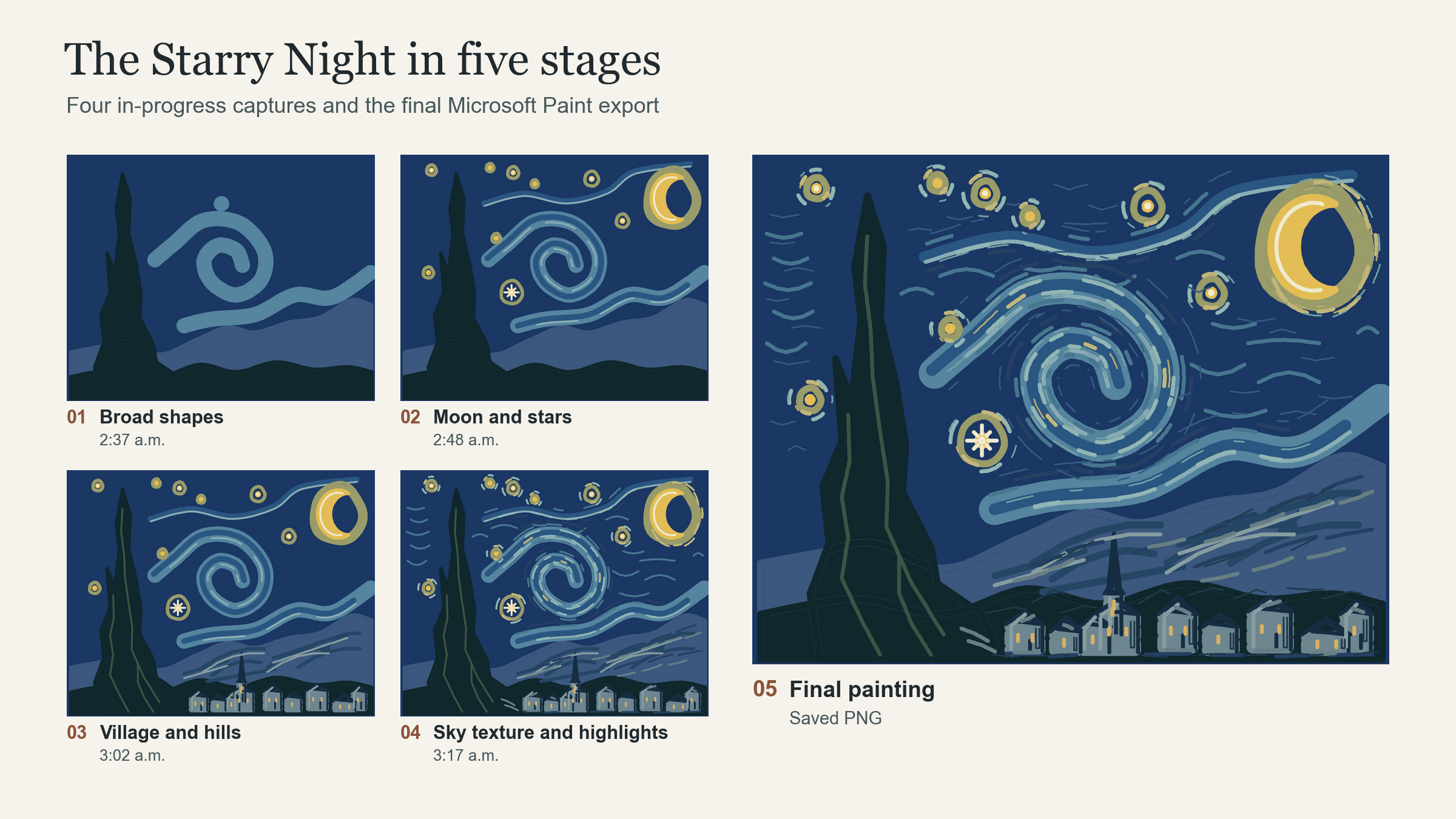
Made with Terra 6.1 Medium
B. The postcards and Coastal Light
Greetings from the Moon and Greetings from the Deep Sea tested whether saved procedures could survive a layout change. After resizing Paint and locating its controls again, the worker reused six procedures for operations including fills, shapes, lettering, and saving. The rocket and submarine gave the worker different elements to draw using the same underlying operations.
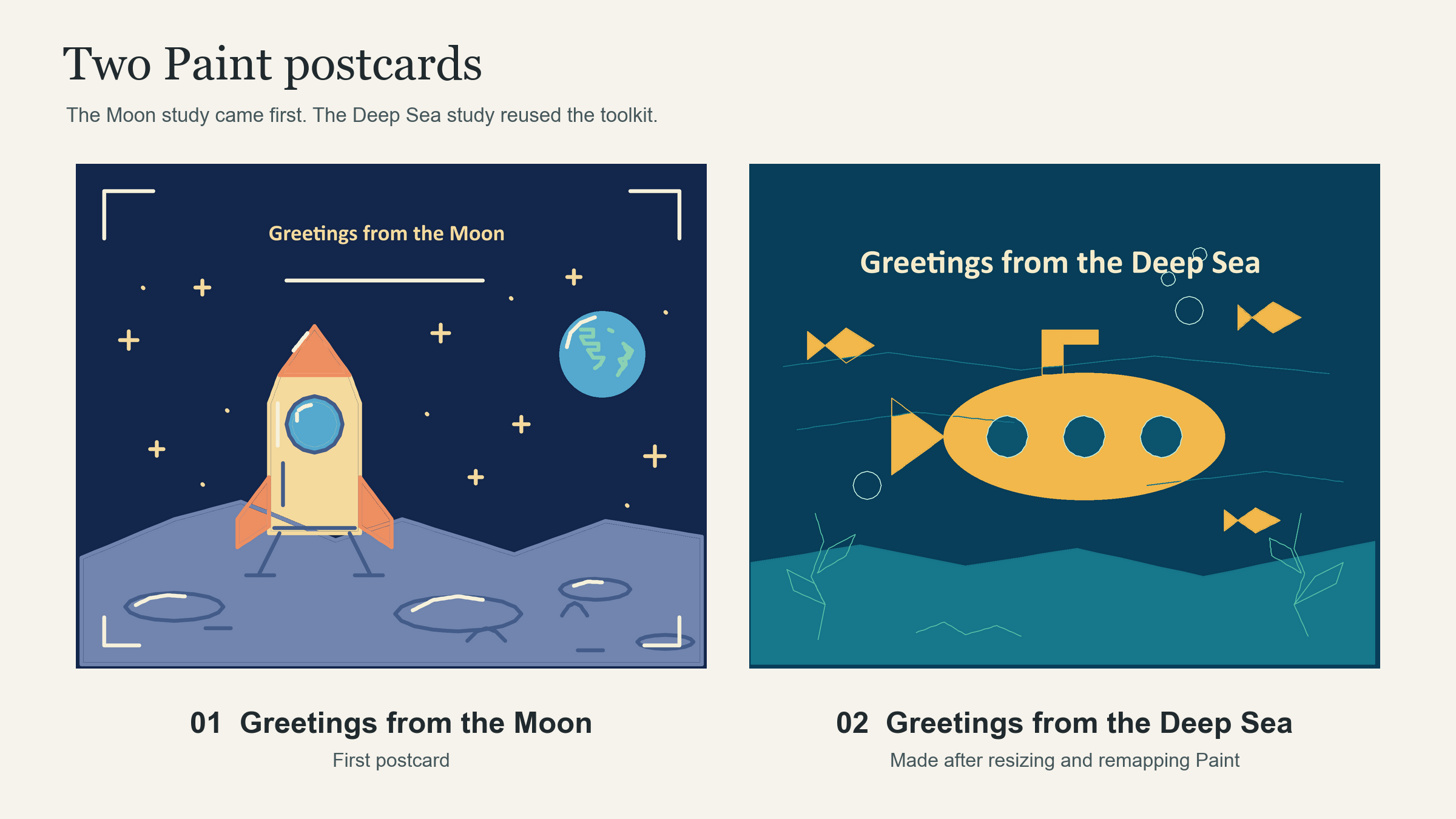
Made with Terra 6.1 Medium
Coastal Light came out of a broader Paint lab after another layout change. It combined brush, shape, text, selection, and file operations on a lighthouse composition. These studies showed a form of portability that matters in everyday software. A worker can retain the procedure and locate its targets again when a window moves or its controls shift.
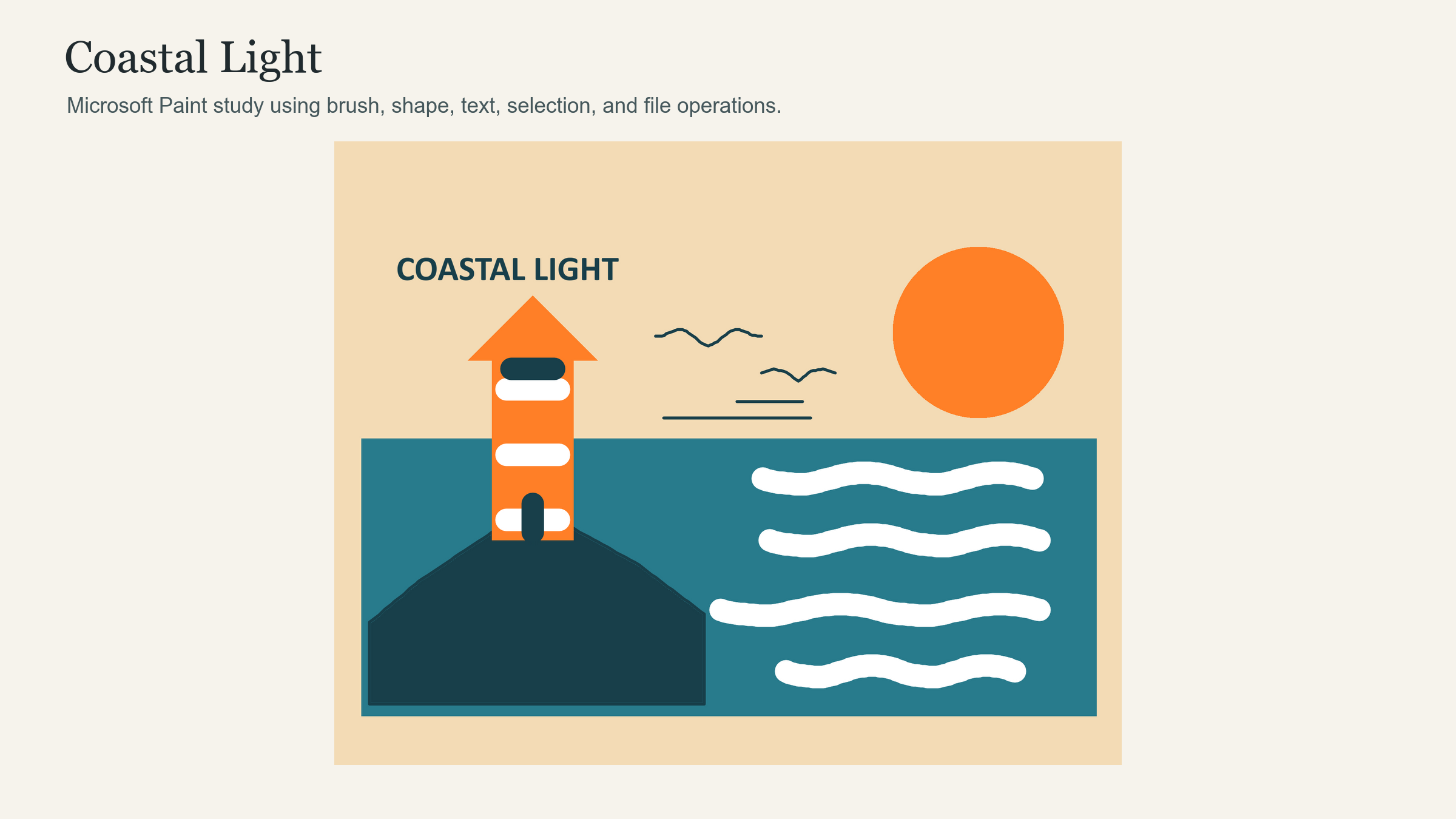
Made with Terra 6.1 Medium
C. The five travel badges
Moon Expedition established the baseline. In Ocean Explorer, the worker shortened HEX entry, although status polling still added calls. In Forest Ranger, it folded shape setup into a reusable sequence. Desert Voyager and Polar Research exercised the improved recipes on new artwork. The progression was uneven. Desert took longer than Forest, in part because the worker had to investigate a disappearing title.
From Moon to Polar, recorded tool dispatches fell from 397 to 264, or 33.5 percent. Direct input attempts fell from 72 to 23, or 68.1 percent, as more work ran inside recipes. The comparable control-to-capture interval fell from 17m42s to 10m10s, about 43 percent. The runs that developed new procedures recorded toolkit work separately. That distinction matters. Teaching a technique takes time, and the value of the investment depends on what happens when somebody uses it again.
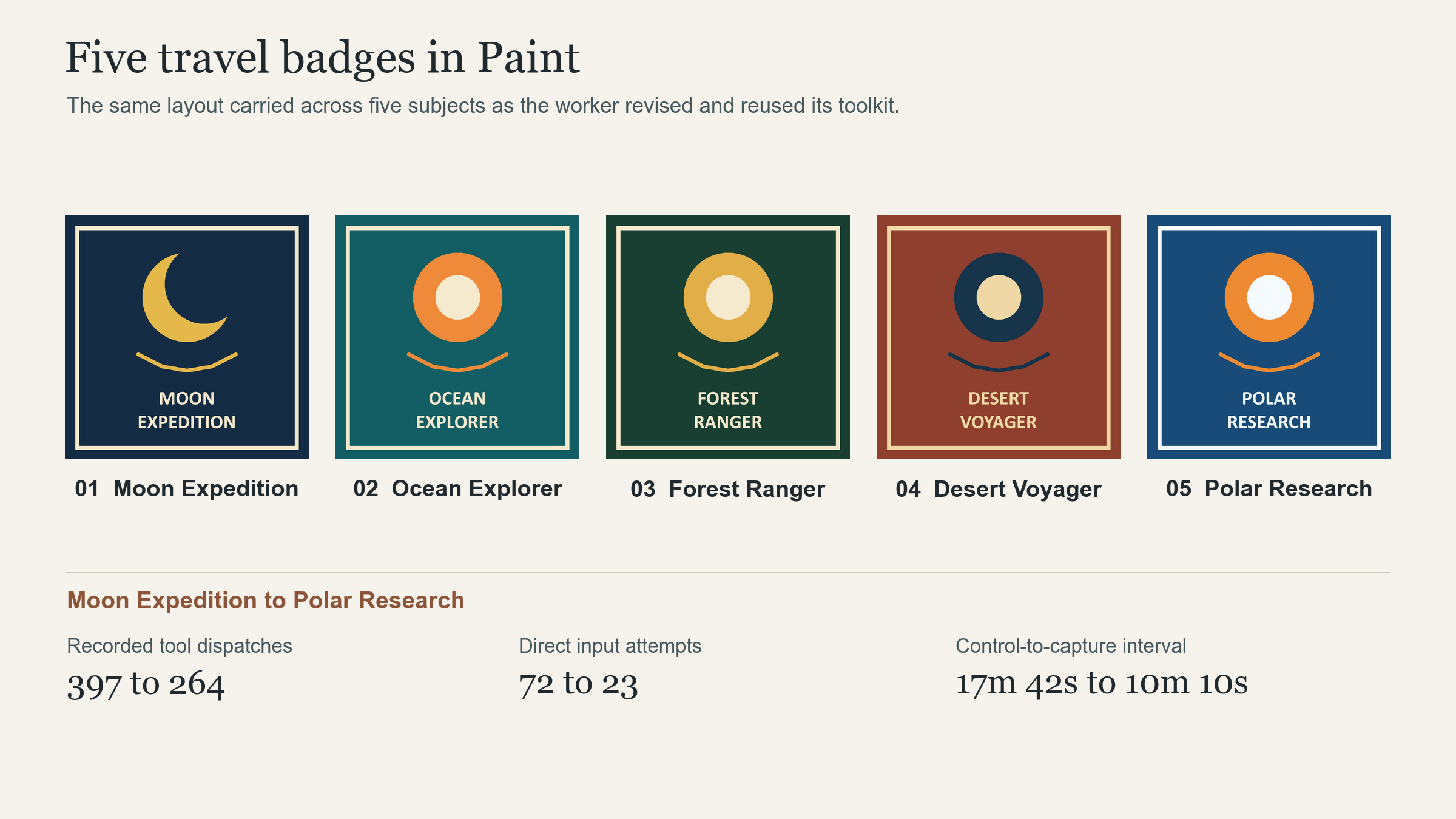
Made with Terra 6.1 Medium
V. Vermeer — From Autonomous Practice to Guided Apprenticeship
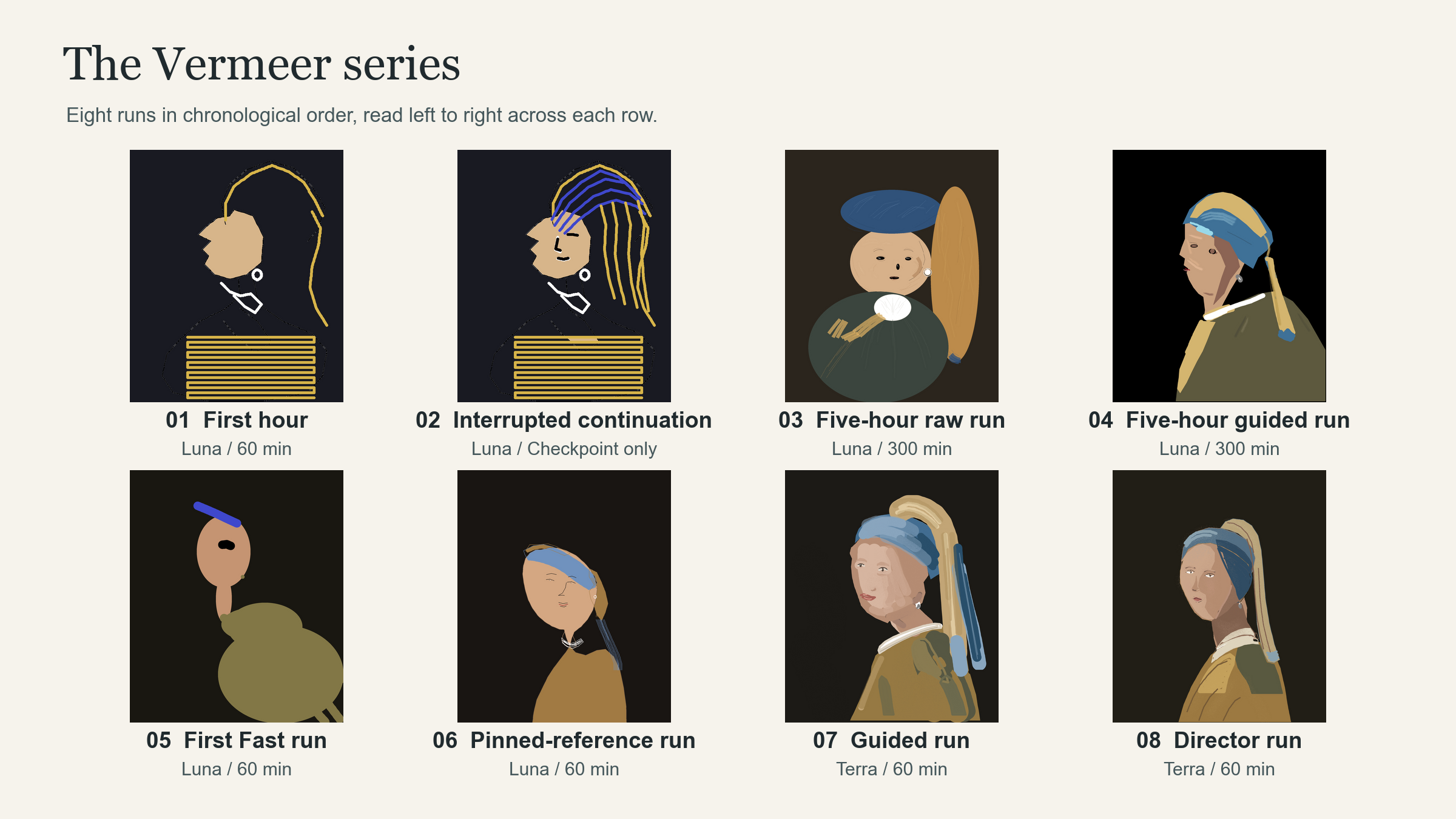
The first Vermeer had a face in the geometric sense. Luna painted a flat tan polygon, drew a white ring for the pearl, and ran a series of gold bars across the coat. By the last study, Dotty could point out a problem with the light on the cheek and watch Terra address it while the hour was still running. The series improved unevenly. A later Luna study relied on ellipses, and the final Terra portrait still placed the figure too low and small. But what we could ask the worker to improve had changed.
A portrait makes the tradeoff behind RWI visible. If a worker can select a color or set up a brush in one call, more of the same hour is available to check a bad edge, reconsider the silhouette, or take another pass at the face. The badges gave us numbers for the first part of that proposition. Vermeer let us see what the worker did on a task where the next move still required judgment.
All eight studies used the same source image of Girl with a Pearl Earring. Seven produced final PNGs, and one ended with a continuation checkpoint. Model and routing labels reflect requested settings where the runtime could not independently confirm them. Mauritshuis collection record
A. The first Luna hour and the interrupted continuation
In the first study, GPT-6 Luna Medium used Dots Body 0.43.0 to draw in an existing blank 844 × 1000 Microsoft Paint canvas. The canvas already matched the reference’s proportions closely. Luna drew the portrait through Paint’s controls and kept the source image outside the canvas. It reused a stroke-batching recipe from the earlier flower exercise for three passes covering the contours, the gold marks, and the white collar and pearl. It also reused routines for entering HEX colors and setting brush width. A procedure developed for one drawing had carried over to another. Luna saved no new persistent recipe during that hour.
The first painting stroke came 34 minutes and 54 seconds into the 60-minute window. That left just over 25 minutes on the painting clock after setup and recovery. The saved image shows a dark ground, an angular tan face with no interior features, a gold headscarf outline, a white collar and ring-shaped pearl, and parallel gold strokes across the lower garment. The planned progress PNGs never materialized. At the deadline, Paint still showed a GIF save dialog. Luna stopped painting on time and saved the finished canvas as a PNG about three minutes later, during finalization.
The next session started from a separate copy of that PNG. Luna added facial marks, indigo headwrap bands, and gold scarf folds. The surviving checkpoint was saved about 20 minutes and 40 seconds into the continuation. The connection authorized to act on my PC stopped accepting commands around minute 28, ending the run early. Those first two panels help explain why later builds emphasized readiness, recovery from blocked actions, and getting the worker back to the canvas quickly.
B. What changed when we taught Luna during the work
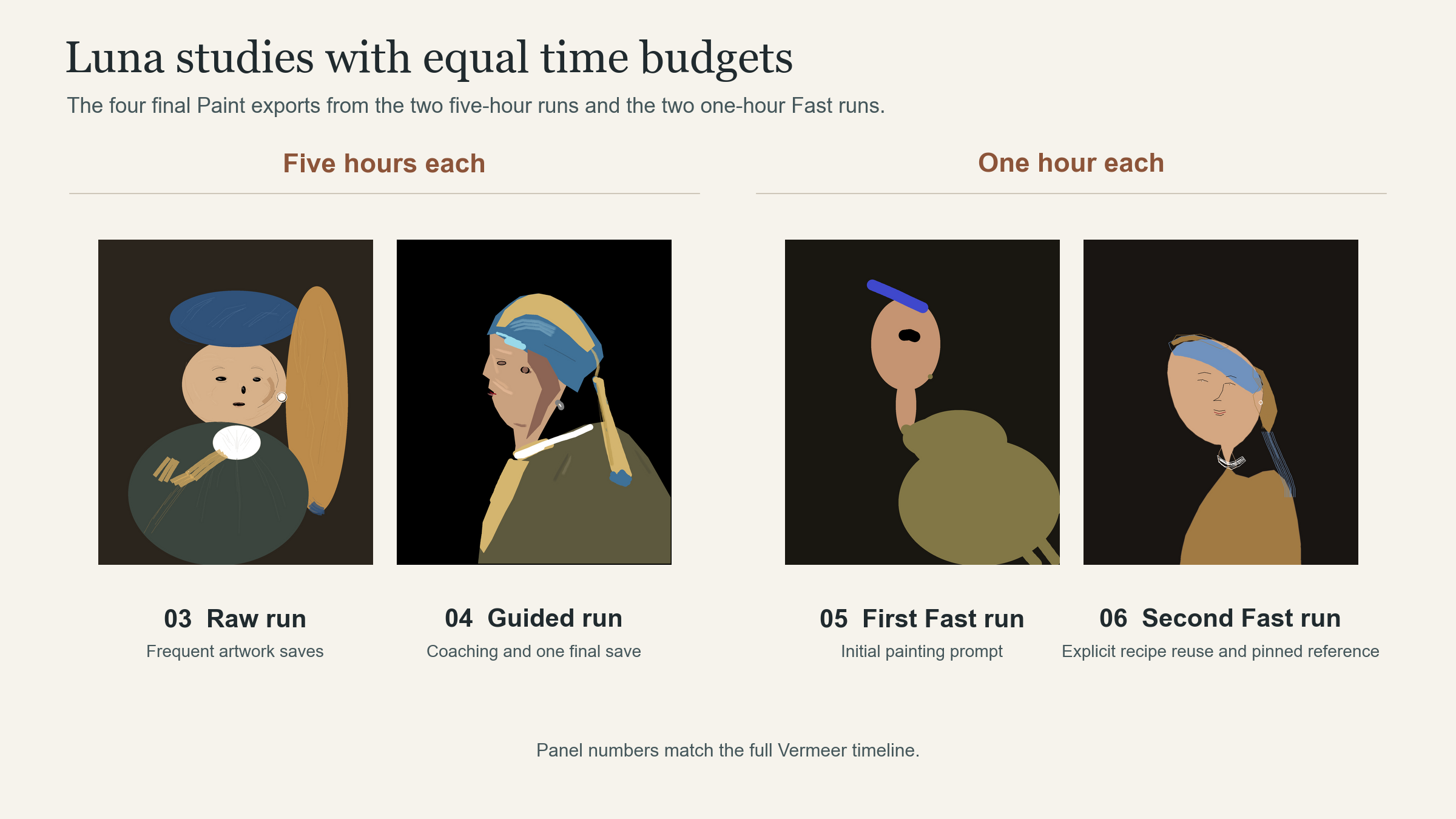
In the raw five-hour run, Luna built the figure from large geometric shapes and saved frequent revisions. The cloud checkpoint reached Library version 39. The portrait had a face and costume, but the simplified shapes made the head and body read as separate pieces.
We kept the same harness build for the guided five-hour run, started on a fresh canvas, and changed how we worked with the agent. Dotty and I asked for a sloped shoulder, an irregular turned face, and a diagonal headwrap. Once Luna had those forms, we could give more precise feedback about the eyes, collar, pearl, and light on the robe. We used Vision for progress images and saved the artwork once at the end.
I also asked for a faster way to enter a chosen color. The inherited HEX-swatch recipe ran 28 times, taking 0.33 to 0.47 seconds per recorded invocation. That measures the recipe’s execution. The worker still had to choose the color and inspect the result. Over the same five-hour budget, recorded dispatches fell from 1,034 to 631, about 39 percent, and we judged the guided composition closer to the reference. Coaching, recipe use, and save cadence all changed between the runs.
C. Explicit recipe reuse and the pinned reference
The first one-hour Luna Fast study relied on ellipses and heavy strokes. Its prompt gave Luna the painting task without explicitly directing it to reuse the Paint recipes we had already developed. One of those procedures used Paint’s Line tool to join segments into a continuous, closed outline directly on the canvas. It gave the worker a way to draw a turned face or sloping shoulder with geometry specific to the portrait. For the second Luna Fast study, we explicitly told the worker to search for and reuse the existing Paint recipes, including the Line-tool procedure for drawing closed shapes.
We also added reference pinning between those two one-hour Luna Fast studies. Dots Body 0.45.9 improved recipe discovery by program. 0.45.10 made a chain return a current observation automatically when it was ready. On November 27, 0.45.11 added the ability to attach a pinned reference beside that observation. Earlier Vermeer runs had access to the same source image. The second Luna Fast run was the first in the series to receive it alongside the current canvas as part of the normal chain response.
To pin a reference, the worker registers a task-supplied image once and gets a reference ID. It supplies that ID when starting a chain. When the chain returns its observation, the worker gets two labeled images together, the current app view and the pinned target. It can compare the angle of the head it just drew with Vermeer’s, then use the live view to place the next stroke. If the task moves to a new target, a later chain can select a different pinned image.
The same comparison loop could serve other programs. A web agent could compare a rendered page with an approved mockup. A CAD agent could compare a viewport with a target drawing. An agent configuring older software could compare the current dialog with a screenshot of the expected settings. The reference mechanism is reusable across programs. The procedures for changing what’s on screen usually depend on the controls in each program. These studies exercised the comparison loop in Paint.
Across the two Luna Fast hours, standalone views fell from 94 to 13, while recorded recipe-mediated input calls rose from 14 to 60. The second portrait had a clearer head angle and shoulder. A covered menu and an interrupted observation route still consumed time. The second run combined explicit recipe reuse, paired visual feedback, and a newer harness. The contribution of each change remains unmeasured.
D. The first Terra hour exposed new techniques worth teaching
Both Terra runs requested GPT-6.1 Terra, Low reasoning, Fast mode, with one hour for painting. In the first, Dotty’s checkpoint around nine minutes already showed a recognizable silhouette, headwrap, eyes, and pearl. Dots Body 0.45.12 could check readiness, help recover a blocked click, and wait for a selected region to change and settle before returning the image. This let us judge visible effects such as a fill that arrived after the click.
I saw Terra draw a useful contour and then lose the fill through a gap. I asked for a dependable way to close and fill shapes, along with reusable procedures for selecting color, setting brush size and type, zooming, and scrolling. Some worked immediately. One attempt to set zoom to 60 percent landed at 600 percent. Codex reviewed the results and packaged useful procedures under Microsoft Paint. Several recipes had the correct program name but lacked search tags, which made them harder for a later worker to discover by purpose.
E. The Director hour turned a correction into a recipe
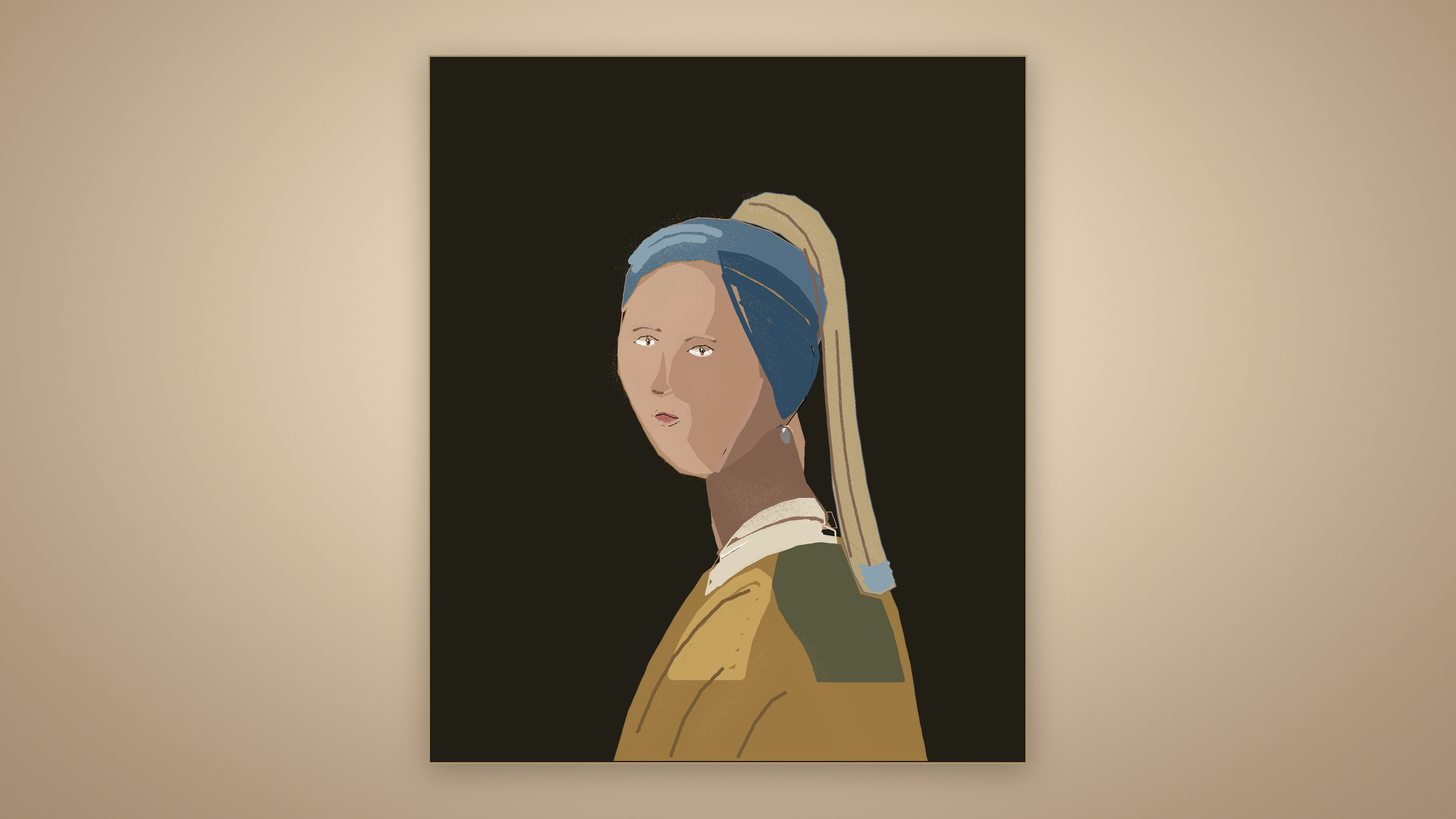
The second Terra hour used the same pinned reference and gave Dotty a read-only Director view in Dots Body 0.45.13. Dotty could compare the settled canvas with the target and review recent actions without taking control of Paint. We aimed for ten-minute check-ins. Dotty delivered five visual critiques during the hour, with some arriving several minutes after their nominal marks.
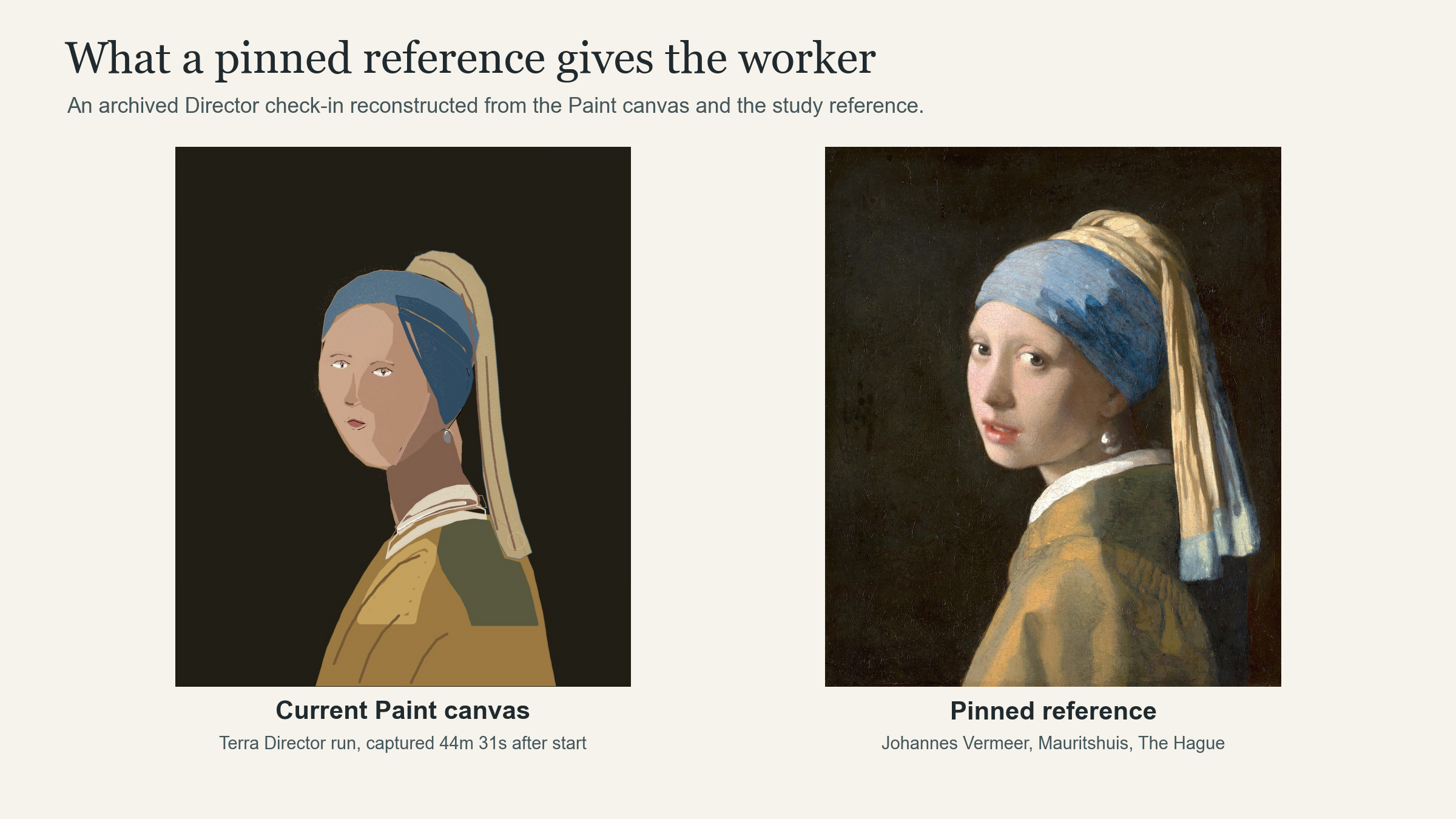
Side by side, the first Terra image has the fuller composition. The Director image has a more clearly defined cheek and nose, a broader collar, and better separation between the scarf and garment. Its figure still sits too low and small, and the neck remains long. The clearest changes are local. Dotty could look at an area the worker had already painted, name what needed attention, and get another pass on it while the clock was still running.
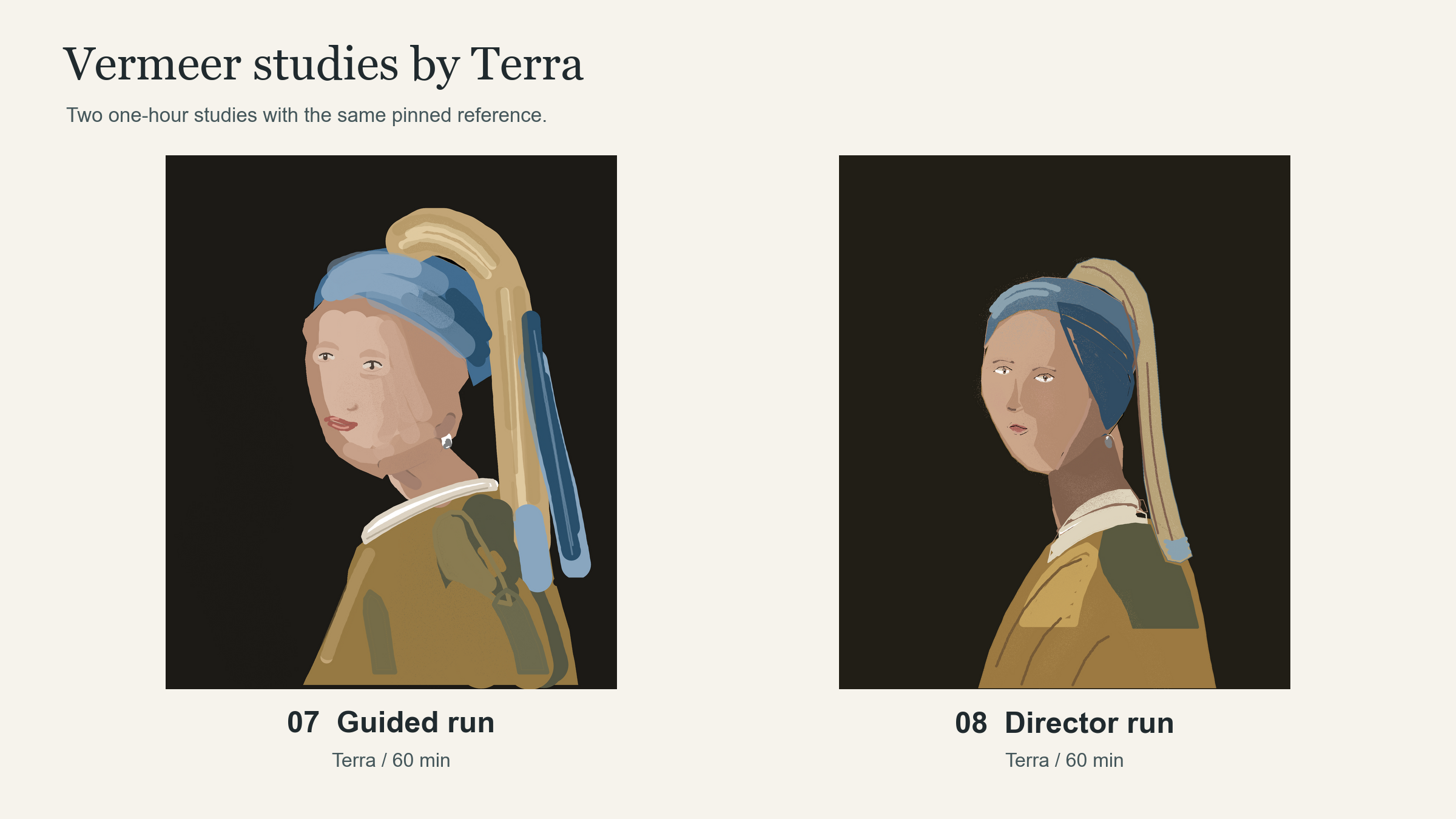
During that run, I asked Dotty to teach Terra a fallback for regions where the bucket fill was unreliable. Trace the outline, then color the interior with overlapping brush strokes. This gave the worker more control over where the color went. Terra saved a tagged recipe 85 seconds after the instruction reached it. The prototype covered the shadow below the chin and touched the pearl. A later coat pass left small gaps. The next revision needed more clearance around nearby details and more overlap between interior strokes. Codex packaged the procedure in 0.45.14 as an experimental Microsoft Paint recipe.
Across the two Terra hours, recorded tool calls fell from 428 to 189, about 56 percent, and measured tool-call time fell by about 100 seconds. The worker also made fewer separate review calls. During the second hour, Terra built most action chains directly and used its newly written brush-fill recipe three times. The 31 saved recipes available at the start of that run had zero recorded uses. We saw Terra turn coaching into a procedure and put it to work during the same session. Reuse of the earlier recipes remains unverified for that run.
The second painting shows what Terra could refine within the hour. That is consistent with the idea that less time spent on routine operations can leave more time for decisions and corrections. The records tell us how much measured tool-call time fell. How Terra spent the rest of the hour, and which changes contributed most to the refinements, remain open.
VI. Efficiency, Learning, and Transfer
A. What the clock can tell us
The studies measured different things. The badge series gives us a comparable elapsed interval for recurring work. The five-hour Luna comparison shows fewer dispatches and a visible change in the resulting composition. The Terra studies give us two one-hour windows with different rates of review, different guidance, and more detailed evidence of what the worker did. Judging the paintings gives us a qualitative account of progress within each window. A numerical quality-per-hour estimate would need a predefined rubric and independent ratings.
The Director run illustrates why fewer calls and less elapsed time can diverge. Recorded connector dispatch occupied about 379 seconds. Recorded input occupied about 184 seconds and overlapped with dispatch. The timed interval left 53 minutes and 41 seconds unattributed. The records cannot divide that time among model reasoning, shell work, image delivery, or other waits. The run recorded just two standalone connector views during the hour, while the broader work and wrap-up recorded 158 image-view events. Those figures cover different scopes. They show why a reduction in manual screenshot requests tells us only part of the story about image handling.
A fuller measurement would follow a chain through local execution, settled capture, image delivery, review, and the start of the next action. That would tell us where a smaller recipe, a better image handoff, or a simpler review procedure actually returns usable time to the worker.
B. What a later worker can inherit
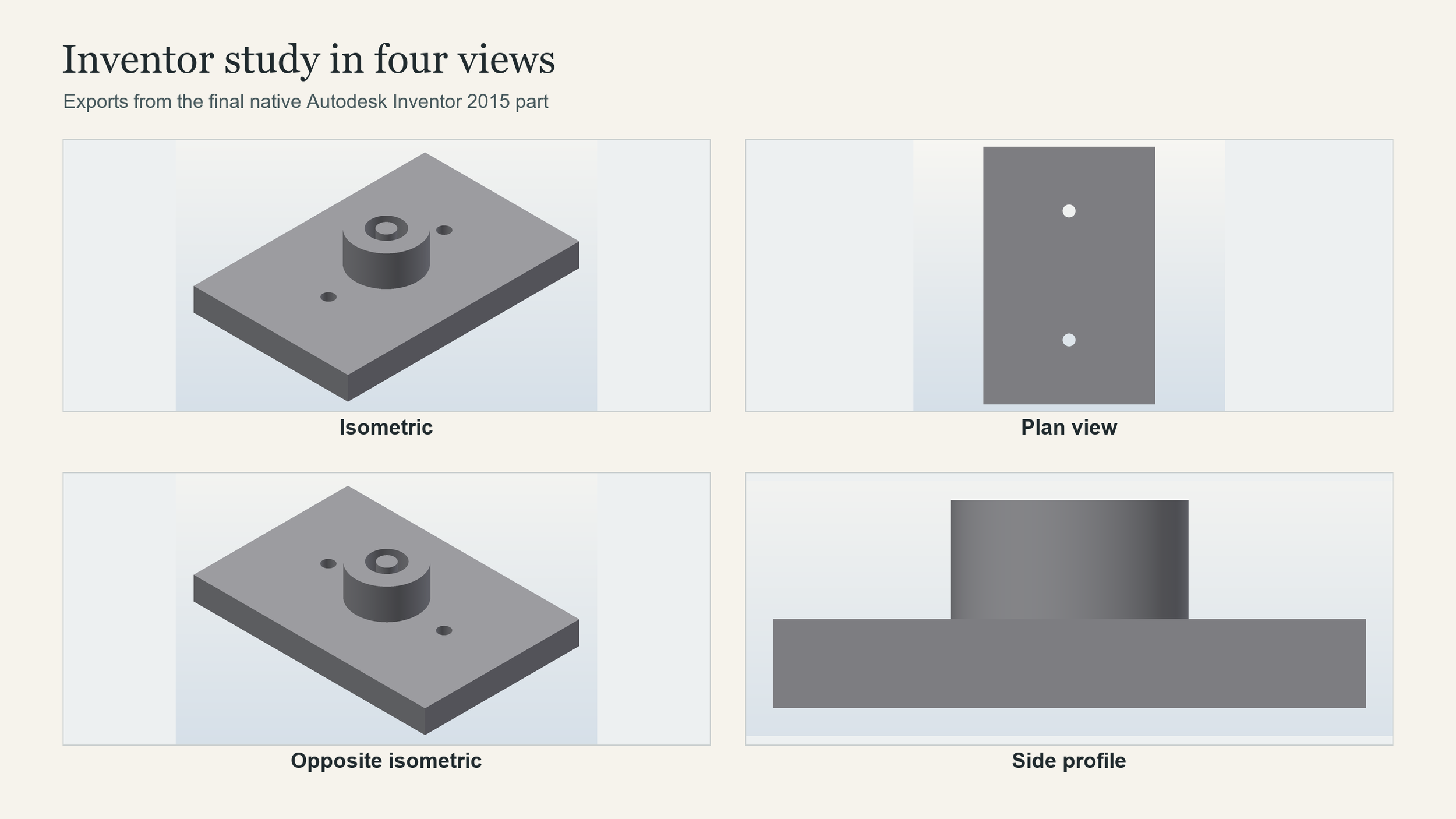
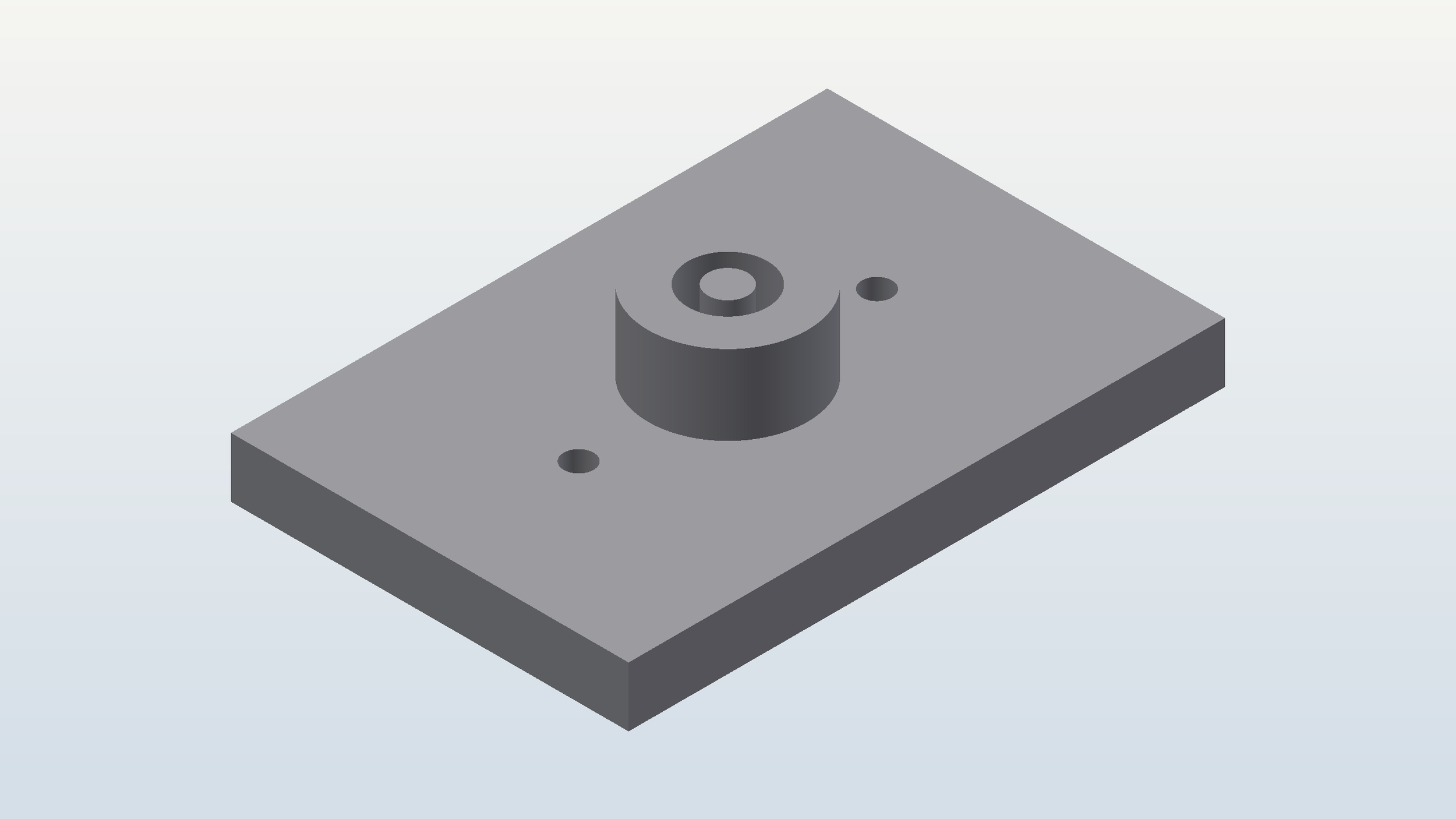
The postcards and badges show procedures carrying across artifacts and some layout changes. In an older version of Autodesk Inventor, the desktop harness produced editable native part files. Some dimensions and geometry were only partially verified. The result shows that the same harness could operate another kind of software. A reliable Inventor kit would still need its own recipes and ways to check the resulting work.
In the smaller browser study, 22 of 24 synthetic trials verified, including all eight recovery tests. A fresh worker invoked a frozen catalog recipe in a separate transfer test. The ordinary matched trials recorded zero recipe invocations. The lesson is that availability, discovery, invocation, and verified effect are separate events. A recipe with the right tags may still go unused. A recipe that ran may still produce a result that needs repair.
A controlled follow-up would keep the model, harness build, reference, time budget, and save policy fixed. It would vary recipe availability, discovery instructions, and human guidance independently, then assess the visible results using the same criteria. The apprenticeship test would come after teaching. Freeze the application kit, give it to a fresh worker, and measure what that worker can reproduce.
VII. Related Work and the Case for a Hybrid
A. Where RWI fits
Robotic process automation demonstrates the value of executing known sequences quickly. Screenshot-driven computer use lets an agent operate software through visible controls. Structured browser automation gives it direct access to page elements. Dots Body combines those capabilities with a library that can grow as the worker learns procedures during actual use.
Voyager accumulates executable skills through exploration and feedback in Minecraft. Agent Workflow Memory extracts recurring routines for web agents. Hermes supports agent-created and revised skills, and Playwright MCP exposes structured browser actions. The experiment here concentrates on a form of digital apprenticeship within ordinary applications. A human can see an operation fail, express a better technique, and have a worker preserve the resulting procedure together with evidence of what it did. In the Terra run, we could follow that progression from a live painting problem to a tagged recipe another agent could find. We could also see why it needed revision. Voyager · Agent Workflow Memory · Hermes skills · Playwright MCP
B. From UI procedure to connector
I would like every application to have a good connector. A dedicated connector can express an operation in the application’s own terms, such as exporting a specified CAD model in a specified format. It can use structured state and report errors that the worker would otherwise have to infer from screen changes. Many useful programs already have a keyboard, menus, and a set of actions people know how to perform. That is enough to start teaching an agent.
For me, the question is whether I can bring an application into my workflow today. Waiting for a dedicated connector means waiting for somebody else to choose that application and decide which actions matter. A general desktop runner lets me start with the interface I already use, even if the program is old. Where a structured interface exists, as in the browser, the worker can use it for the parts that benefit from it.
A mature recipe library can become groundwork for a connector. It records the actions people repeatedly need, the inputs those actions expect, the circumstances in which they fail, and the evidence that shows they succeeded. Some of those operations can eventually move behind a native API. Others can continue running through the UI. The hybrid gives the worker a useful route as the software around it changes.
VIII. Conclusion — From a Screenshot to Digital Apprenticeship
I started out wanting my agent to take a picture of my desktop. That request became a harness I could teach. I could watch the work, recognize a missing technique, and ask Dotty to help the worker develop it. When the worker saved that technique as a recipe, another agent could find it later. The improvement lived in a procedure we could inspect, execute, and revise.
I think people should often be part of that loop. An experienced person knows which menu path is dependable, which exception matters, and what an acceptable result looks like. Those details are hard to capture by asking someone to describe their entire job in advance. They come out in the work, especially when something fails. A digital apprentice can learn a procedure at that moment and preserve it for the next worker.
At a company, people across teams could teach the parts of the work they know best. A designer could teach a legacy CAD export. An operations team could teach a browser-based review. A finance team could teach a spreadsheet reconciliation. Each group could test and improve its own procedures and tag them for the programs and tasks they apply to. A shared library would let an agent find those pieces and use them in a larger job.
The modularity matters. A team can improve the CAD export in the program where it runs. Another can shorten the browser process on its own schedule. When those procedures have clear inputs, outputs, and ways to verify the handoff, an agent can use them together across different applications and environments. The result is a library of working knowledge that can keep growing as people teach it and new workers put it to use.
I just wanted a picture of my desktop. Now I have a semi-automated, human-in-the-loop recursive learning harness that runs through Codex and interfaces with Dot. Oopsies!